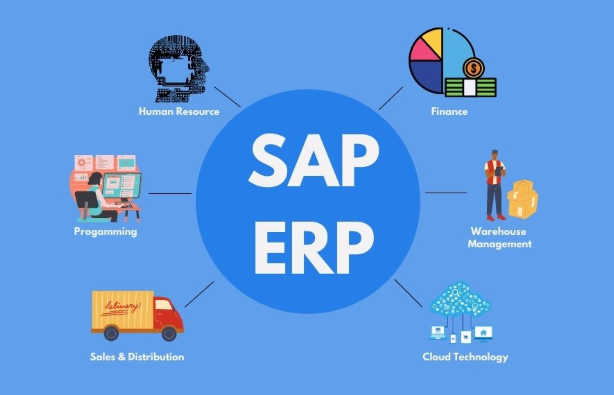
SAP software powers many modern businesses, and it drives efficient operations across industries. It helps organizations manage processes, data, and workflows with precision. Many companies adopt SAP because it centralizes information and strengthens decision-making. Moreover, SAP improves productivity by automating complex tasks. Consequently, teams operate faster and with greater accuracy.
Understanding SAP Software
SAP software stands for Systems, Applications, and Products in Data Processing. It is enterprise resource planning software built to manage business functions in real time. Companies use SAP to gather data, analyze performance, and streamline operations. Furthermore, SAP connects departments like HR, finance, sales, production, and supply chain.
SAP runs on an integrated system, which means information flows seamlessly across teams. Employees access up-to-date data without manual entry or duplicated work. Additionally, this integration reduces errors, increases transparency, and accelerates communication. Therefore, SAP becomes a powerful core system for organizations aiming to scale efficiently.
Key Features of SAP Software
SAP includes advanced reporting tools that convert raw data into useful insights. Dashboards help decision-makers monitor performance, track goals, and spot issues quickly. Moreover, real-time analytics enable companies to respond faster to market changes and customer needs. As a result, growth becomes easier to manage.
Users benefit from strong security features because SAP protects sensitive information and controls access. Encryption and user permissions maintain compliance with global standards. Additionally, role-based access enhances data integrity, ensuring employees only see relevant information. Consequently, companies reduce risk while improving operational discipline.
Furthermore, SAP supports cloud deployment and hybrid environments. Organizations scale resources based on demand. Integration with AI and automation accelerates output. Meanwhile, built-in workflow tools eliminate repetitive steps.
How SAP Software Works
SAP operates through modules that interact inside one digital ecosystem. Each module controls a different business function while sharing information instantly. Managers simplify planning and forecasting because real-time data remains available across every department. Additionally, automation handles routine tasks, reducing workload and human error.
Data stored in SAP updates automatically when entries change in any department. Therefore, sales orders update inventory levels, financial statements update accounting, and HR changes update payroll. Moreover, dashboards allow quick monitoring of performance indicators. System integration helps teams work collaboratively and with fewer delays.
Benefits of SAP Software for Businesses
Businesses choose SAP because it boosts efficiency and profitability. Automated processes reduce time spent on manual work. Furthermore, standardized workflows improve consistency, making operations more predictable. As a result, customers receive better service and faster delivery.
Additionally, SAP improves financial accuracy through features like budget tracking, billing automation, and cost forecasting. Decision-makers access real-time financial statements without spreadsheets. Therefore, planning becomes strategic and confident. Moreover, centralized data eliminates communication gaps between departments.
Scalability remains another advantage of SAP. Growing businesses expand modules as needs change. Meanwhile, compliance tools ensure legal and industry standards remain intact. Consequently, risk reduces and long-term stability increases.
SAP Software Modules Explained
SAP ERP includes modules such as SAP FI for finance, SAP MM for materials management, and SAP SD for sales and distribution. Each module solves unique business challenges while operating inside one system. Moreover, HR modules manage payroll, recruitment, and employee data.
Production and supply chain modules monitor manufacturing operations, quality control, inventory, and logistics. Consequently, production efficiency improves dramatically. Additionally, CRM modules enhance customer management and sales forecasting. Teams make smarter sales decisions through data-driven insights.
Furthermore, companies expand functionality by integrating additional modules. This flexible structure adapts to local or global business models. Meanwhile, updates improve features over time.
Implementation Challenges and Best Practices
Many organizations struggle during SAP implementation because configuration requires planning. Teams must train employees to understand system workflows. Additionally, businesses need clear goals before deployment. Therefore, strategy plays a major role in successful adoption.
Slow implementation often results from poor data migration or weak change management. Moreover, lack of training reduces system value. Companies overcome these issues by appointing internal SAP experts, improving communication, and reviewing progress. Consequently, user adoption becomes smooth and effective.
Furthermore, testing each module ensures performance remains high. Continuous evaluation strengthens long-term success. Meanwhile, feedback cycles refine user experience and boost productivity.
Conclusion
SAP software transforms businesses through automation, integration, and real-time data control. Companies gain efficiency, faster decision-making, and scalable growth. Additionally, SAP supports long-term digital transformation with strong security and reliable performance. Therefore, organizations wanting smarter operations should consider SAP implementation immediately. Take the next step and explore SAP for your business growth today.
FAQs
1. What is SAP software used for?
SAP manages business operations like finance, HR, sales, inventory, and supply chain through one integrated platform.
2. Which businesses need SAP?
Medium to large enterprises benefit most, especially those with multiple departments requiring fast data communication.
3. Is SAP difficult to learn?
Learning SAP requires training, but consistent practice makes it easier. Training improves skill development quickly.
4. How does SAP improve productivity?
SAP automates tasks, reduces manual work, and provides real-time insights, helping employees work faster and more accurately.
5. Can small businesses use SAP?
Yes, scalable modules allow smaller companies to start small and expand features as they grow.